01
In the app, not the inbox
Low-stock alerts can be shown in-app for each location instead of being emailed, so the warning lands where the work happens.

Low stock and expiring batches raise alerts inside the POS, on the screen your team is already looking at, for each location and each receiving batch.
Set Days to notify before expiration per item or per receiving batch, and choose which employees see urgent alerts.
Low-stock warnings used to arrive only by email, which meant they arrived somewhere nobody was working. They can now surface in the POS itself.
Low-stock alerts can be shown in-app for each location instead of being emailed, so the warning lands where the work happens.
Expiration alerts give you a notice period per item or per batch, so short-dated stock can be marked down or moved while it still sells.
Choose which employees receive urgent in-app notifications, so an alert reaches somebody who can act on it.
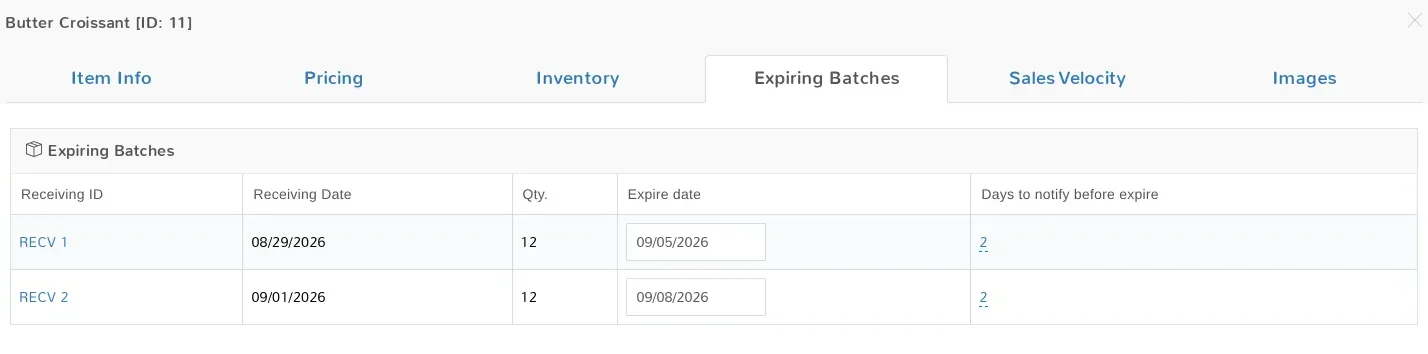
Two deliveries of the same item rarely expire on the same day. Each receiving batch carries its own expiry date and its own notice period.
Give the item a Days to notify before expiration value, or set one on the receiving batch when a delivery arrives unusually short-dated.
Each receiving records its own quantity and expiry date, so batches stay separate on the item instead of merging into one number.
When a batch enters its notice window the alert appears in the POS and on the Expiring Items Report, in time to discount it or move it.
Low-stock alerts can be shown in the app for each location, so a store hears about its own shelves rather than everyone else’s.
Variation and kit items now alert the same way plain items always have, instead of being passed over.
A sale that takes an item to or below its reorder level raises the alert. It fires once when the item goes low, and again only after it has recovered, so a slow seller does not nag your team every day.
Low-stock reporting feeds the purchase order workflow, so what you learn turns into an order to a supplier.
Expiring quantity for items with variations reports that variation’s own remaining stock, rather than zero or a sibling variation’s figure.
Reorder points are yours to define per item and location, so a fast mover and a special order are not held to the same rule.
See also advanced inventory, or read Stock and expiration alerts in the Help Center.
Start a free trial, turn on Alert in in-app messages for urgent notifications under Store Config → Application Settings and fill in Employees to alert for urgent notifications, tick Use in-app notifications for stock alerts on each location, then set a notice period on the items that matter.
See it in action
Quantities that match the shelf, reorder levels per location, variation-level stock, and an audit trail behind every number.
